Visual 2D Scatter-Plot
Exposure Sorter
Organize thousands of astrophotography and nightscape RAW exposures into Siril-ready calibration folders in seconds.
The 2D Exposure Scatter Plot
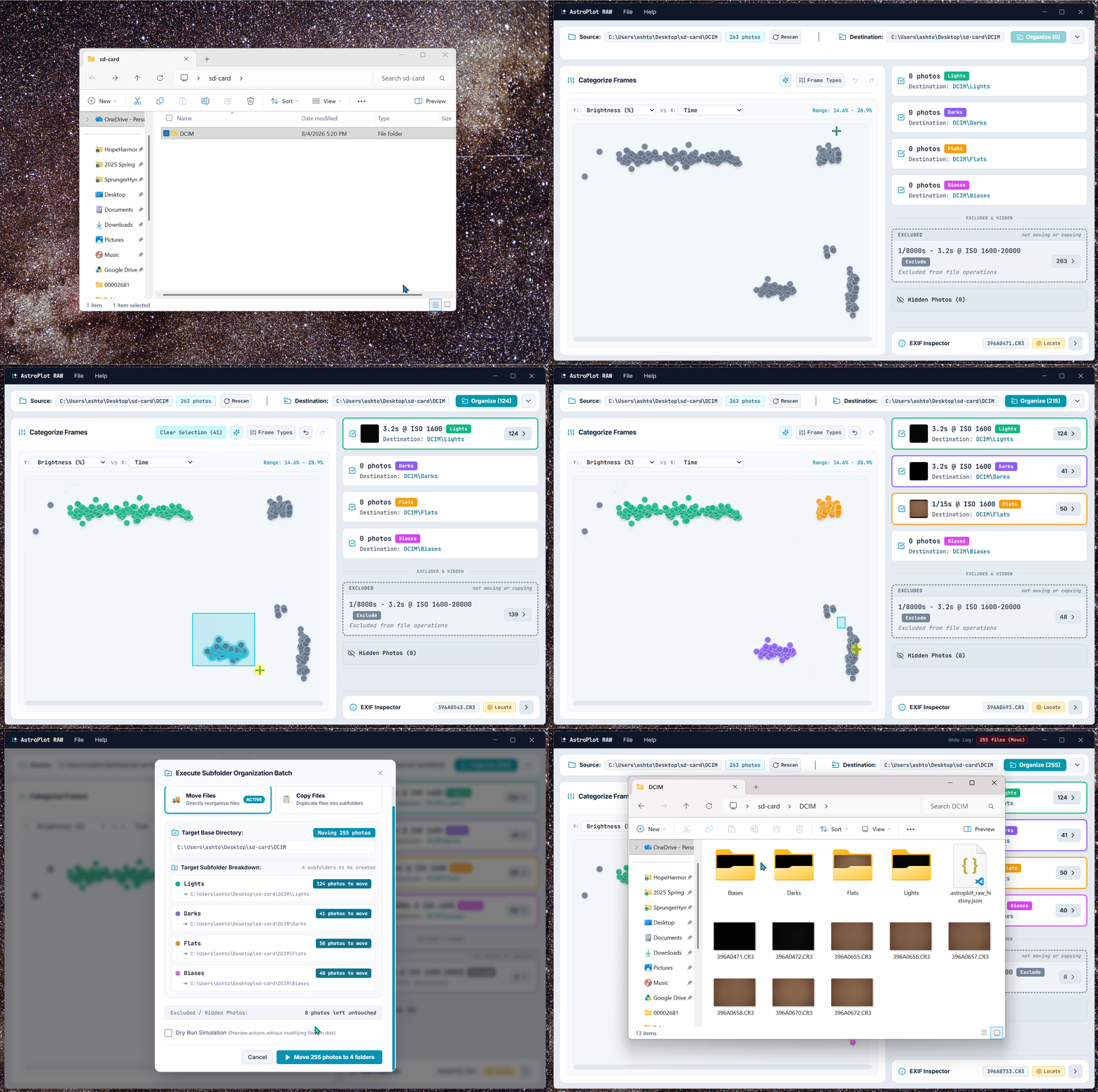
Every dot is an individual RAW exposure. Instead of clicking through thousands of thumbnails, your entire shoot is plotted by Luminance (brightness) vs. Capture Time. Your Light, Dark, Flat, and Bias frames automatically separate into distinct color-coded clusters, letting you box-select and sort hundreds of files in seconds.
How It Works
- 1 Drag Folder Drag your SD card or shoot folder directly into AstroPlot RAW.
- 2 Box-Select Clusters Lasso or box-select natural clusters on the 2D scatter graph (Luminance vs. Capture Time).
- 3 Export Folders Export clean /lights, /darks, /flats, and /biases subfolders with 1-click Undo safety.
One universal license key unlocks AstroPlot RAW on both Windows and macOS. 100% offline & private.
Tested and verified for Windows 10 and Windows 11 (64-bit).
In active development for Apple Silicon (M1–M4) and Intel Macs.
Technical Facts
Supported Camera Formats
- ✓Canon (.CR2, .CR3)
- ✓Nikon (.NEF)
- ✓Sony (.ARW)
- ✓Adobe DNG (.DNG)
- ✓Astronomical FITS (.FITS, .FIT)
- ✓Fujifilm (.RAF), Olympus (.ORF), Panasonic (.RW2)
- ✓TIFF, JPEG, PNG
System & Architecture
- ✓Windows 10 / 11 (macOS build coming soon — notify me)
- ✓14-Day Full Access Free Trial
- ✓100% Offline / Local CPU processing
- ✓Zero Telemetry / Zero Cloud Reliance
- ✓Local SQLite Rollback Transaction Undo
- ✓Perpetual License ($9.99, no subscription)
Frequently Asked Questions
Does AstroPlot RAW alter, convert, or touch my original RAW files? ↓
Never. AstroPlot RAW never alters your sensor pixels, modifies embedded EXIF tags, or recompresses files. It only performs clean filesystem copy or move operations to organize files into subfolders. Every action writes a local transaction log (.astroplot_raw_history.json), allowing you to click Undo at any time to instantly restore every file back to its exact original location.
Does the application require an internet connection or send telemetry? ↓
100% offline. AstroPlot RAW runs entirely on your local CPU. It contains zero background telemetry, zero phone-home tracking, and zero cloud uploads. Your photos and metadata never leave your computer.
Which camera RAW formats and astrophotography files are supported? ↓
AstroPlot RAW natively decodes Canon (.CR2, .CR3), Nikon (.NEF), Sony (.ARW), Fujifilm (.RAF), Olympus (.ORF), Panasonic (.RW2), Pentax (.PEF), Adobe DNG (.DNG), and astronomical FITS (.FITS, .FIT), as well as standard TIFF, PNG, and JPEG files.
How does this fit into Siril or DeepSkyStacker workflows? ↓
AstroPlot RAW maps your tagged clusters directly into the standard /lights, /darks, /flats, and /biases directory structure. For Siril, this means automated scripts (like OSC_Preprocessing) run immediately without missing-frame errors. For DeepSkyStacker, you can drag entire clean folders into DSS groups in seconds without manually selecting file ranges.
Questions or Feedback?
Have a feature request, question, or need support? Reach out directly: