
How to Cull Bad Astrophotography Frames Fast Without Squinting at Thumbnails
Stacking bad subs dilutes your Signal-to-Noise Ratio (SNR) and turns crisp stars into mush. Here is how to stop wasting 45 minutes manual-blinking 400 heavy RAW files and pinpoint cloud dips and ruined frames in seconds using 2D scatter plots.
Every astrophotographer knows the post-session dread: you come home with 400 sixty-second sub-exposures from your star tracker or equatorial mount. You know that somewhere in that four-hour sequence, a high-altitude cloud bank drifted through, a 15-mph wind gust shook the tripod, or a satellite train plowed across the center of your framing.
If you stack those ruined frames, they poison your final integration. But finding them usually means opening your files in a dedicated viewer, waiting for 45-megapixel sensor files to de-mosaic, and pressing the right-arrow key four hundred times while squinting at tiny stars.
There is a faster, mathematically sound way to cull subs without manual blinking.
The 3 Major Killers of Astrophotography Subs
Before looking at how to filter bad frames, it helps to understand what ruins a sub-exposure and whether stacking software can automatically save you:
| Defect | Physical Cause | Does Sigma Clipping Fix It? | Action Required |
|---|---|---|---|
| High Clouds & Haze | Light scattering & atmospheric extinction | No. Skyglow spikes and contrast drops across whole frame. | Must Cull |
| Wind Gust / Tracking Error | Mount periodic error or tripod oscillation | No. Star shapes elongate or double, softening sharpness. | Must Cull |
| Airplanes & Satellites | Fast transient streaks through field of view | Yes (with 25+ frames & Winsorized Clipping). | Optional (Safe to Keep) |
Why Stacking Software Rejection Can't Fix Clouds
Many beginners assume that modern stacking software like Siril, DeepSkyStacker, or PixInsight handles everything with Winsorized Sigma Clipping.
Sigma clipping works by evaluating each pixel coordinate across all aligned frames. If 30 frames record a pixel value of 1,200 ADU, and one single frame records 45,000 ADU because a satellite flashed over that exact pixel, the outlier is rejected.
However, clouds are not transient point-source outliers. When thin cirrus clouds pass through your target:
- Target light from your nebula or galaxy is absorbed and scattered (extinction).
- Local light pollution bounces off the water crystals, lifting background sky brightness across the entire frame.
Because this change affects the entire frame rather than a handful of outlier pixels, sigma clipping incorporates that cloudy frame into the average. Including just 10 cloudy subs in a 60-sub stack can erase the contrast of faint tidal tails and dust lanes you spent hours collecting.
Why Manual "Blinking" Fails at Scale
The standard advice in forums is to "blink" your data. You open Siril's sequence viewer, Blink in PixInsight, or Adobe Bridge, and tap through your subs one by one.
In practice, this method suffers from three critical flaws:
- De-Mosaicing Overhead: Modern mirrorless cameras (Canon EOS R5, Sony A7R IV, Nikon Z7) produce 45MB to 80MB uncompressed RAW files. De-mosaicing and debayering hundreds of files takes 10 to 15 minutes of disk thrashing before you can even begin reviewing.
- Slow Gradients are Invisible to the Eye: High-altitude cirrus clouds don't arrive like a thunderhead. They creep in as a thin haze that subtly reduces star count and lifts background levels by 15%. When toggling through frames 2 seconds apart, your eyes adjust to the brightness change and fail to notice the gradual contrast decay.
- Human Fatigue: After reviewing 150 consecutive dark frames of the Cygnus loop, your eyes glaze over. You miss trailing stars on frame 234 and cloud haze on frame 310.
The Modern Solution: 2D Scatter Plot Culling
Instead of looking at photos sequentially in image space, plot every file in metadata parameter space:
- X-Axis: Chronological Capture Time across the night.
- Y-Axis: Relative Mean Frame Luminance (%).
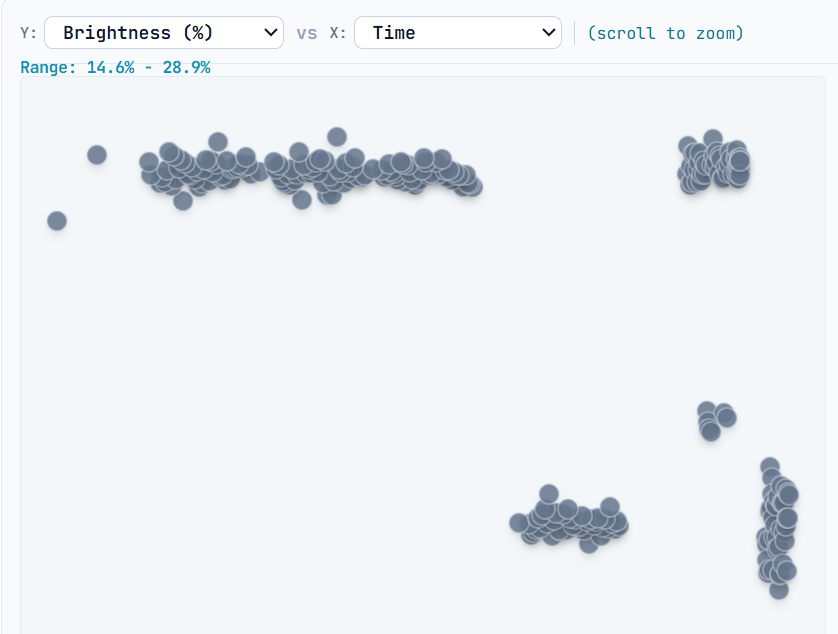
In clear skies, target light frames form a smooth, consistent horizontal band across the session. When clouds roll in, the data points plunge visibly downward below the main cluster. You can spot an hour of bad weather at a single glance.
When plotted this way, atmospheric physics does the work for you:
- Clear Sky Sub-Exposures: Maintain steady luminance and tight clustering within a 2% to 4% band.
- Passing Cloud Bands: Create an immediate, unmistakable downward "V-shaped" dip on the graph.
- Sudden Dew Formation: Causes a continuous downward slope in transmission over time as your corrector plate or lens fog up.
How to Cull Bad Subs with AstroPlot RAW in 30 Seconds
AstroPlot RAW was engineered specifically to solve this bottleneck. Because it reads raw EXIF headers directly across multi-threaded CPU cores without full debayering, an entire night's shoot of 500 RAW files loads in 2 to 3 seconds.
Here is the step-by-step culling workflow:
1. Drop Your SD Card Folder
Drag your raw card directory into AstroPlot RAW. The app immediately parses all exposure parameters and displays your session on the 2D scatter plot.
2. Identify the Cloud Outliers
Look at your Light cluster across the middle. Any points dipping noticeably below the primary band represent frames affected by cloud scatter or obstruction.
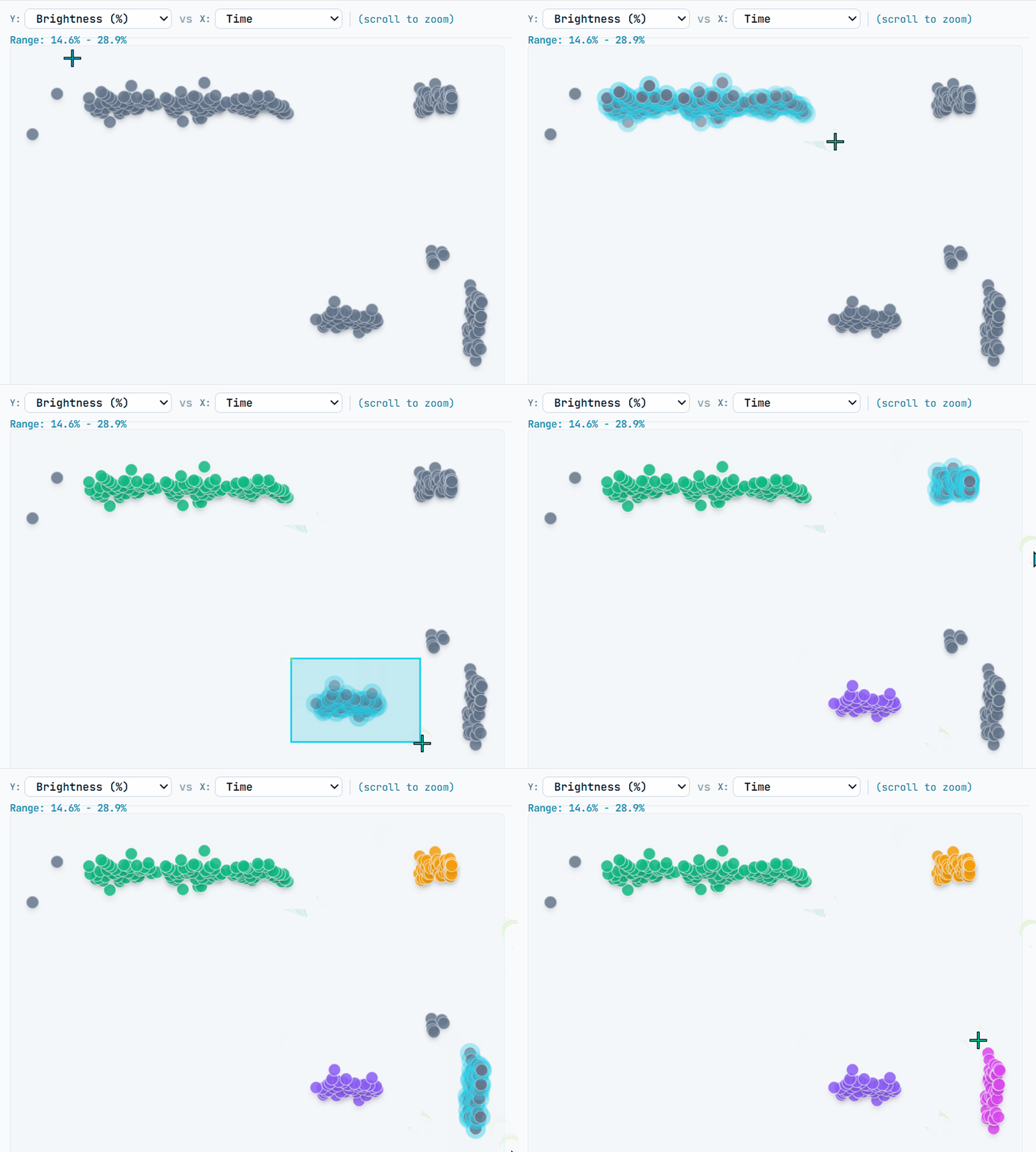
Simply click and drag a marquee selection box over the degraded outlier subs and press H (Hide) or E (Exclude). They vanish from the active export sequence immediately.
3. Export Only Clean Subs for Stacking
Once the bad frames are hidden, click Organize. AstroPlot RAW copies or moves only the verified clean lights into your destination /lights folder (and sorts your darks, flats, and biases at the same time).
When you feed these clean subs into Siril or DeepSkyStacker, your integration SNR is protected, registration finishes faster, and no ruined frames contaminate your master stack.
One universal license key unlocks AstroPlot RAW on both Windows and macOS. 100% offline & private.
Tested and verified for Windows 10 and Windows 11 (64-bit).
In active development for Apple Silicon (M1–M4) and Intel Macs.